Solitaire Classic Games
- 4.6
- Rating
- 500.00K
- Installs
- Free
- Price
 Analysis by App-foxy
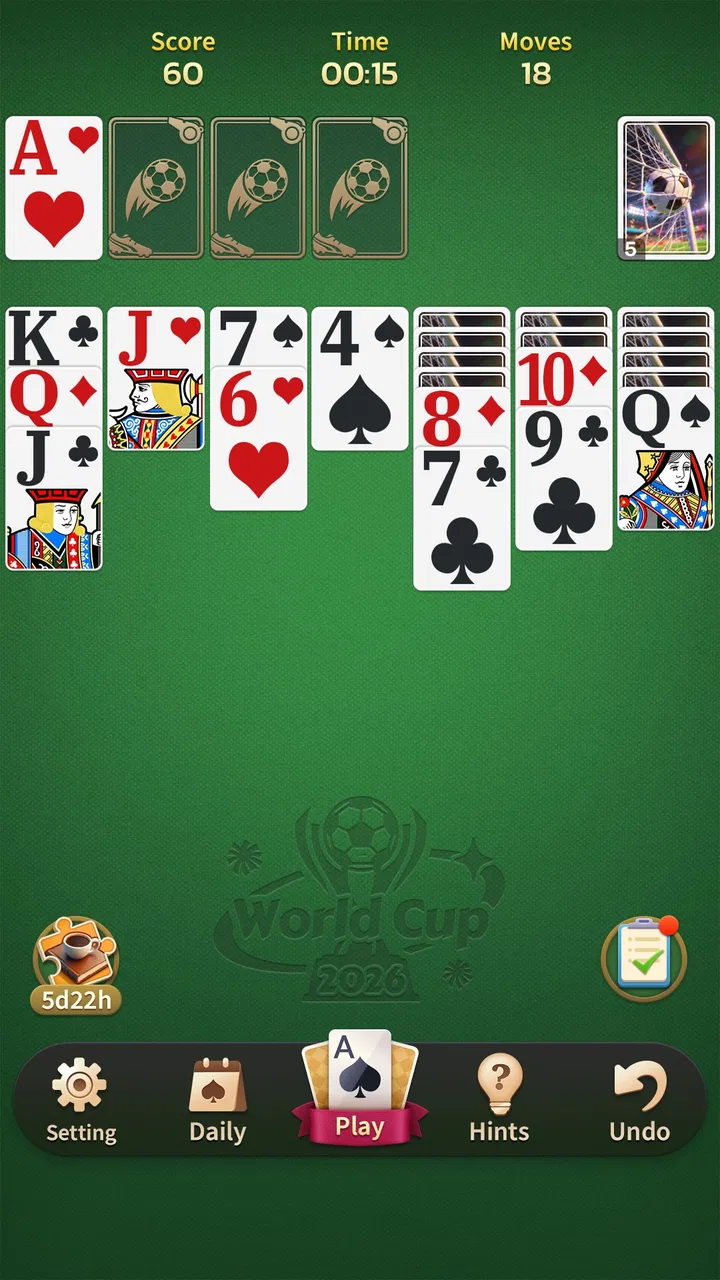
I tend to judge a solitaire game by a simple question: does it make a short break feel calmer, or does it turn a quiet card game into another noisy task? After spending time with Solitaire Classic Games, I found that its main appeal is its straightforward approach. It is a free card game from JoyDot, built around familiar solitaire play rather than a large collection of distractions. That makes it especially easy to consider for a shared household device, where different people may want a quick, low-pressure game without learning a complicated system first.
The store summary describes it as easy to play and suited to daily solitaire sessions, and that is a fair way to understand its character. I would not choose it for competitive multiplayer, deep strategy campaigns, or a long list of experimental card modes. I would choose it when I want the recognizable rhythm of arranging cards, clearing a tableau, and taking a break at my own pace. The important distinction is that its simplicity is both its strongest quality and its clearest limitation.
How it fits into everyday shared use
In my experience, solitaire works unusually well on a household tablet or a phone that several people pick up during the day. One person can play for a few minutes after lunch, another can use the same device in the evening, and nobody needs to coordinate a match or wait for an opponent. That makes this game a natural fit for a shared-use situation where the device is passed around rather than treated as one person’s dedicated gaming machine.
You May Also Like

 Blood Strike: 2.5 Anniversary
Blood Strike’s Loadouts Turn Every Drop Into a Tactical Gamble
A close look at Blood Strike’s custom loadouts: how fast access to signature weapons reshapes its battle royale rhythm, rewards preparation, and narrows the gap between fights.

 Pandora - Music & Podcasts
Pandora’s Music Is Easy to Start, but Harder to Recover
Pandora’s strength is its low-effort path from a seed to a station. Its weak spot is how much confidence it asks you to place in connection, setup, and quiet recovery.

 8 Ball Pool
 Is Built on Rivalries, Rematches, and Routine
A close look at the rivalries, rematches, shared routines, and unanswered safety questions that turn a quick pool match into a persistent mobile community.

 Samsung Music
’s Quiet Strength Is Playing What You Already Own
Its reach comes less from spectacle than from dependable access to a personal library. That simplicity is both the app’s strongest retention engine and its ceiling.

 AccuWeather: Weather Radar
AccuWeather Review: A Quick, Clear Forecast for Everyday Decisions
For everyday plans, the best forecast is the one you can understand quickly. AccuWeather makes rain timing, radar, and local conditions easy to act on, with a few trade-offs.

 Hill Climb Racing
Why Hill Climb Racing Still Turns Crashes Into One More Run
A tiny car, a bumpy hill and one more upgrade: Hill Climb Racing keeps resurfacing because its simple chaos makes every near-miss feel personal.
More From Our News Desk
View All News


A realistic example would be a family tablet kept in the living room. Someone waiting for an appointment might open a round, pause naturally when called away, and leave the device for another person. A parent could use it as a quiet activity while a child watches something else, while an older relative may appreciate the familiar card format more than a fast action game. The appeal is not that it creates a family competition; it is that each person can use it independently without disturbing the others.
That independence also means I would not describe it as a social household game. There is no reason to expect shared progress, conversation prompts, or a built-in way for one player to hand a challenge to another. If your household wants a game that brings everyone into the same round, a multiplayer card title would be a better choice. Here, the shared-device benefit comes from low coordination, not from connected play.
The game’s category matters here. As a classic solitaire card game, it asks for attention, but not the kind of constant attention demanded by a racing game or a real-time puzzle. I can put it down when a household task interrupts me and return when I have a quiet moment. That makes it easier to fit around cooking, commuting, waiting rooms, or a short rest, although I still recommend treating the device carefully if several people are taking turns with it.
What to expect when setting it up
Solitaire Classic Games is free, and its content rating is Everyone, so it is easy to consider for a mixed-age household. It runs on Android devices using version 7.0 or later, which covers many older phones and tablets. In practical terms, that lowers the barrier for a spare household device, provided that the device meets that operating-system requirement and has enough general room for another game.
I would still establish a few simple boundaries before putting it on a shared device. Decide who normally uses the tablet, where it is stored, and whether a younger player may open games without asking. These are household decisions rather than features I would attribute to the app. The game itself should not be treated as a substitute for a device-level child profile, screen-time rule, or purchase safeguard.
That last point is worth taking seriously with any free mobile game. “Free” tells me I can install and play without paying an upfront price; it does not, by itself, define how a device handles accounts, store authentication, or other system-level settings. On a shared phone, I would make sure the device owner understands the store account and keeps purchase confirmation under control. This is a sensible precaution, not a criticism unique to this title.
The current version is 1.16.0, and I would check that the installation is up to date before handing the device to someone else. Updates can matter on older hardware, especially when several people rely on the same app during the week. I would also open the game once myself, confirm that the cards are comfortable to read, and make sure the person who will use it understands the basic interaction before assuming it is suitable for them.
That small test is more useful than relying on the age label alone. “Everyone” gives a broad content indication, but it does not tell me whether a particular person will find the card layout easy to follow. A child who is still learning suits and ranks may need an adult nearby. An older player with reduced vision may prefer a larger screen. The game can be appropriate for the household while still being a poor fit for one individual’s accessibility needs.
Keeping household use separate and uncomplicated
Shared devices create a boundary that is easy to overlook: the game may be simple, but the device still belongs to someone. I would avoid assuming that one player’s session represents everyone else’s experience. If the app keeps any local progress or preferences, the next person may encounter the result of the previous player’s choices. Because I do not view this as a dedicated multi-user platform, I would treat the device itself as the boundary and avoid promising separate profiles or independent records.
This is not a major problem for casual solitaire, but it changes how I would use it in a family setting. If one person cares about a personal run or a particular arrangement, a private phone is more suitable. On a common tablet, I would frame each session as temporary entertainment rather than a carefully protected personal achievement. That expectation prevents small disagreements when someone else opens the game and starts a new round.
The same principle applies to account boundaries. I would not ask a child to manage the store account, change device settings, or approve anything connected with installation. An adult can handle the download and then let the player use the game within the normal limits of the household device. This keeps the card activity separate from account ownership and makes the arrangement easier to explain.
For older relatives, the boundary may be about confidence rather than purchases. I would show them how to open the game, begin a round, and leave it when they are finished. I would not assume that a familiar card game automatically makes every touch target obvious. A short demonstration can be enough to turn a potentially frustrating first session into an enjoyable one, especially on a smaller phone.
One useful habit is to agree on a stopping point before a shared session begins. Solitaire can feel harmless because it is quiet, yet “one more round” can extend a break longer than intended. A household rule such as using it only while waiting or stopping when the device is needed by someone else gives the game a clear place in the day. I find that this works better than presenting the app as an activity for unlimited use.
Coordination without turning it into a competition
The strongest household advantage here is that coordination is optional. Nobody has to schedule a match, compare skill levels, or explain why a round ended. That is useful when one person wants a calm activity and another wants the device for something practical. The game occupies a small, self-contained space in the household routine.
At the same time, I would not use it as a tool for teaching cooperation. Solitaire is traditionally a solo format, so the natural interaction is between the player and the cards. A parent can sit beside a child and talk through possible moves, or two adults can discuss a layout, but that cooperation comes from the people using the app rather than from a shared mode I can confirm in the game.
This creates an interesting trade-off. A solo design avoids arguments about turns and makes the game welcoming for someone who does not want to perform in front of others. But it also means that a household looking for a common activity may find the experience emotionally flat. For that purpose, a physical deck, a two-player card app, or a board game may offer more conversation and shared decision-making.
I also prefer not to compare players by speed. A solitaire round can be relaxing precisely because it does not require a fast response. If a family uses the game together, a better approach is to let each person play at a comfortable pace and share observations afterward. That keeps the app aligned with its calm character instead of forcing a competitive structure onto it.
For a household with several users, the most practical coordination rule is simple: return the device where it belongs and do not reset another person’s active session without asking. This sounds obvious, but it matters more than any imagined in-game feature. Since the game is designed for quick personal play, the household routine around the device determines whether it feels convenient or annoying.
Age, trust, and the right expectations
The Everyone rating makes the game broadly approachable from a content perspective. I would feel comfortable considering it for a family device, particularly because a traditional card format is less intimidating than a game built around combat, social pressure, or rapid rewards. Still, an age label is not a complete supervision plan. Younger players may need help with the rules, and adults should decide how much screen time is appropriate.
For a child, the main value is the chance to practice recognizing suits, ranks, and sequences while working through a quiet puzzle. I would present it as a game of patience rather than a guaranteed-win activity. Some rounds may feel satisfying, while others may end without the player finding the desired solution. That uncertainty is part of solitaire, but it can frustrate a young player who expects every attempt to resolve successfully.
For an older adult, the familiar format may be more important than novelty. I can imagine recommending it to someone who wants a recognizable card activity on a phone but does not want to learn a complex interface. My recommendation would depend on the screen size and touch comfort. On a small display, cards and controls can feel cramped even when the underlying game is easy to understand.
Trust also involves being honest about what this app is not. I would not describe it as a supervised educational tool, a family communication platform, or a secure personal space. It is a free card game from JoyDot, and that is the useful starting point. Families can make it part of a healthy routine, but the routine comes from their own rules and conversations.
The game has reached over one hundred thousand installs and holds a 4.8 average from around one thousand three hundred ratings, with close to two hundred written reviews. Those figures suggest that many players respond well to its basic approach, but they do not replace personal testing. A high average cannot tell me whether the layout suits a particular grandparent, whether a child understands the rules, or whether a shared tablet is the right environment.
Where it stands beside other solitaire choices
Compared with a physical deck, this game is more convenient when I do not have a table, enough space, or another person willing to shuffle and deal. It also avoids cards getting bent or lost around the house. The physical deck wins, however, when the goal is conversation, teaching through face-to-face play, or keeping screens out of a child’s routine.
Compared with a feature-heavy digital card collection, Solitaire Classic Games is easier to approach because its identity is clear. I do not need to sort through many unrelated modes before starting a familiar round. The trade-off is variety: players who want several solitaire variants, elaborate challenges, extensive customization, or a more game-like progression may find it too restrained.
Compared with a competitive online card game, it is much less demanding. There is no need to react to another player’s move or maintain a connection for a shared match. That makes it better for quiet breaks and mixed-age household use, but worse for anyone who wants rivalry, live strategy, or a sense of community.
Compared with a puzzle game, solitaire offers a different kind of mental rhythm. The decisions are shaped by card order and available moves, so part of the experience is accepting that not every situation can be solved in the same way. If I want a puzzle with a clearly measured difficulty curve, a dedicated logic game may be more satisfying. If I want familiar rules that I can enter and leave quickly, this title has the advantage.
Small habits that make the experience better
My first practical tip is to use the largest comfortable screen available when introducing the game to another household member. A tablet can make card recognition easier than a phone, while a phone is more convenient for private, short sessions. The better choice is not automatically the newer device; it is the one that lets the player see the layout without squinting or repeatedly tapping the wrong area.
My second tip is to treat the game as a deliberate pause rather than background noise. Before opening a round, I decide whether I have a few minutes or enough time to finish. That prevents the app from becoming an accidental distraction during chores or conversations. On a shared device, this also makes it easier to hand the tablet back without feeling that an important personal session has been interrupted.
My third tip is to teach the rules away from pressure. If a child or older relative is unfamiliar with digital solitaire, I would sit beside them for the first round and explain why a move is possible instead of simply taking over. The goal is not to produce a perfect result; it is to make the card relationships understandable. Once the player recognizes the pattern, the game becomes much more independent.
A fourth useful trade-off is deciding whether the app belongs on a common device at all. Shared use is convenient, but it can blur progress and interrupt personal routines. If someone in the household values solitaire as a private daily ritual, installing it on that person’s own phone may be better. If the goal is occasional entertainment for whoever has the tablet, the shared arrangement makes more sense.
I would also avoid judging the game after one unlucky round. Solitaire naturally includes layouts that feel more satisfying than others, and a single session may not show whether the pace suits you. Give it enough time to decide whether the basic card flow is enjoyable. On the other hand, if you already know that you need constant novelty, social play, or a strong progression system, more testing is unlikely to change the central limitation: this is a focused solitaire experience.
My household verdict
After using it as a quiet card game rather than expecting a large entertainment platform, I see Solitaire Classic Games as a sensible choice for households that value simplicity. Its free price, Everyone rating, familiar format, and support for Android 7.0 or later make it easy to consider for a range of devices. JoyDot has kept the central idea clear, which is exactly why it can work for a shared tablet or a short personal break.
I would recommend it to someone who wants a traditional solitaire session without multiplayer pressure, complicated setup, or an aggressive learning curve. I would also recommend it to a family that wants an optional activity people can use independently, as long as everyone understands that the app is not a shared-progress or family-management tool.
I would skip it for a household seeking a game that actively brings people together. I would also look elsewhere if I wanted extensive card variants, competitive play, detailed personal separation, or a more substantial sense of progression. Those are not small omissions if they define what you want from a mobile card game.
For the right situation, though, its restraint is a strength. I can open it during a quiet gap, play without asking anyone else to join, and put it aside when the device is needed. That balance makes it a good fit for calm, occasional use across a household. My final view is positive but specific: choose it for accessible solo solitaire on a shared or personal Android device, not as a substitute for a social card game or a fully featured family platform.
FAQs for Solitaire Classic Games
01What features does Solitaire Classic Games offer?
Solitaire Classic Games offers a variety of features to enhance your gaming experience. You can enjoy multiple modes like Klondike, Spider, and FreeCell. The game also includes customizable card designs, backgrounds, and daily challenges to keep you engaged. Additionally, it supports offline play, so you can enjoy it without an internet connection.
02Is Solitaire Classic Games free to download and play?
Yes, Solitaire Classic Games is free to download on both Android and iOS devices. While the game is free, it may contain optional in-app purchases that offer additional features or remove ads. These purchases are not necessary to enjoy the full experience of the game.
03Does Solitaire Classic Games contain ads?
Solitaire Classic Games does include ads, which help keep the game free for users. However, if you find the ads disruptive, there is an option to remove them through an in-app purchase. This allows you to enjoy an uninterrupted gaming experience while supporting the developers.
04Is Solitaire Classic Games suitable for all ages?
Absolutely! Solitaire Classic Games is designed to be accessible and enjoyable for players of all ages. Its simple rules and engaging gameplay make it a great choice for both young players and adults looking for a relaxing pastime. Parental guidance is suggested for younger children due to in-app purchases.
05Can I play Solitaire Classic Games offline?
Yes, one of the great advantages of Solitaire Classic Games is its offline capability. Once downloaded, you can play without needing an internet connection. This makes it perfect for travel or areas with limited connectivity, allowing you to enjoy your favorite solitaire game anytime, anywhere.
Pros
- Simple
- easy-to-navigate interface.
- Variety of solitaire game modes.
- Daily challenges boost engagement.
- Offline play available
- no internet needed.
- Minimal ads for a smoother experience.
Cons
- Limited customization options.
- Occasional app crashes reported.
- No multiplayer or social features.
- Basic graphics
- lacks visual flair.
- In-app purchases can be pricey.

Solitaire Classic Games
Gallery